
Building a CI/CD Security Gate with AWS Security Agent: From Pull Request to Penetration Test
Sumit Kumar Dubey
23 min read


Introduction
Most security checks happen too late. By the time a vulnerable change reaches the main branch, it is one deployment away from production. The better place to catch it is the pull request, while the developer still has the code open in front of them.
In my earlier post I used AWS Security Agent (now part of AWS Continuum) only for penetration testing.
This time I wanted to see the other half of the story, the part that happens before anything is deployed. So I built a small pipeline. A developer opens a deliberately vulnerable pull request, Security Agent reviews it, GitHub blocks the merge, an administrator uses an authorized bypass, a fixed version merges cleanly, and GitHub Actions deploys the result to a server on AWS. A penetration test sits at the end as the final check against staging. I did not rerun that stage for this post, so I show the results of my March run and label them as such.
I ran all of this in a lab over a weekend, using OWASP Juice Shop as the application. Some of it worked the first time. A lot of it did not, and those parts taught me the most, so I have kept them in. Where I did not test something, I say so.
In this post we will walk through:
How AWS Security Agent reviews a pull request and what its findings look like
Why a red check does not block a merge, and what actually does
How an authorized bypass works and what it leaves in the audit log
How GitHub Actions deploys merged code to EC2 without a single stored AWS key
What happened when the agent reviewed my own pipeline code
Where the penetration test fits at the end, and what it costs
Architecture Overview
The pipeline has three stages, and AWS Security Agent shows up in two of them.
Stage 1, the code review gate. A developer opens a pull request. Security Agent reads the changes and posts its findings as comments. A branch ruleset in GitHub then decides whether the merge is allowed. If the findings are not dealt with, the merge is blocked. A repository admin can still go ahead through an authorized bypass, and GitHub writes that decision to the audit log.
Stage 2, the deploy. Once code is merged, GitHub Actions builds a Docker image, pushes it to Amazon ECR and tells an EC2 instance to run it. Nobody logs in to the server and no AWS keys are stored in GitHub.
Stage 3, the penetration test. Security Agent attacks the running staging application from the outside. Anything it finds goes back to the developer as a new pull request, which has to pass the gate again.
So the same agent works as a code reviewer at the start and as an attacker at the end. The merge decision in the middle belongs to GitHub and to people, not to the agent. I will come back to that point because it is the most important thing I learned.
Lab Setup
The lab has two halves. One is a GitHub repository where pull requests are reviewed. The other is an AWS environment where the merged code runs. Here is what I used:
GitHub repository (private): a copy of OWASP Juice Shop, imported into a private repository so the vulnerable code is not sitting in public.
GitHub Team plan: needed to enforce merge rules on a private repository. More on that below.
AWS Security Agent: reviews every pull request, and later runs the penetration test.
GitHub Actions: builds the image and runs the deployment.
Amazon ECR: stores the container image the pipeline builds.
Amazon EC2 and Docker: one t3.medium instance running the Juice Shop container.
Application Load Balancer: puts the application on the internet, with my own domain pointing at it.
AWS Systems Manager: sends the deployment command to the instance, so no SSH access is needed.


Why I needed a paid GitHub plan
I started with the repository under my personal GitHub account. I created a ruleset on it and GitHub showed this message: "Your rulesets won't be enforced on this private repository until you move to GitHub Team organization account."
That sentence matters. On a free personal account you can create rules on a private repository, they look active, and they do nothing. A merge gate that only looks like a gate is worse than no gate, because everyone assumes it works. I moved the repository into a new GitHub organization on the Team plan, which costs $4 per user per month, and the rules became real.


A mistake that cost me time: imported workflows
When you import a repository, GitHub copies its workflow files too. Juice Shop ships with a full set of its own CI workflows, including a compliance bot. When I opened my first pull request, that bot labeled it as invalid and spam and closed it, and dozens of jobs started running on my copy. In a single afternoon they used about 328 of the 3,000 included Actions minutes. The gross usage showed $1.97, and none of it was billed, but it was a mess.
I disabled Actions first, then removed the imported workflow files through a proper pull request (the third one in this lab). If you import a repository, look inside the workflows folder before you do anything else.


Setting Up AWS Security Agent for Code Review
Everything in this section is done from the AWS console. There are four parts.
1. Create an Agent Space. An Agent Space is the workspace for one project. It holds the repository connections, the review settings and the findings. I named mine after the repository.


2. Connect GitHub. Under Integrations you register the AWS Security Agent GitHub App, install it on your organization, and pick the repository it can see. I limited it to a single repository, which keeps the permissions small. During the install, AWS tells you plainly that the app can view your GitHub resources and use scoped write permissions, such as posting review comments and proposing fixes.


3. Enable code review comments. Back in the Agent Space, the repository appears as a connected resource. Turn on code review comments for it.
4. Pick a trigger. I chose "Pull request ready for review". A review starts when a ready pull request is opened, reopened or receives new commits. Draft pull requests are skipped.


Custom security requirements
AWS provides managed requirement packs, and you can write your own. The console works on two levels. You create a pack, then you add individual requirements inside it. I made this mistake myself: I created three packs and moved on, then noticed each one showed zero requirements. A pack with nothing in it checks nothing. I went back and added one requirement to each.


Each requirement has a name, a description, an applicability statement and compliance criteria.


One honest observation. In the findings that followed, the agent never named my custom requirements. Its comments read like a general security review. I cannot tell from the output whether my packs influenced them, so I am not going to claim that they did.
The Vulnerable Pull Request
Juice Shop is already full of vulnerabilities, but that does not help here. A pull request review looks at the changes in the pull request, not at the whole codebase. (The console can also start a full repository scan, which I did not run for this post.) So to give the agent something to find, I added one new file on a branch. It contains three deliberate flaws:
A SQL query built by pasting the email from the request straight into the query string
A hardcoded key, the well known example key from the AWS documentation, returned in the response
No authentication or authorization check on the handler


AWS Security Agent posted a review: 3 findings, 1 critical and 2 high. Each one was an inline comment with the same shape: a severity, what the issue is, evidence tracing the flow from input to output, and a recommended fix.


Two things stood out.
It reasoned about context. The agent pointed out that my new route was not yet registered in the server, so the injectable code was dormant until someone wired it up. It also noticed that the key matched AWS's documentation placeholder rather than a live credential, while warning that the same pattern would leak any real secret.
It found something I had not planned. The missing authorization check, and the fact that my query returned every column including password hashes, came from the agent reading the neighbouring routes in the codebase. Those routes check authorization. Mine did not.
When I reopened the pull request later, the agent reviewed it again. The headline was the same, 1 critical and 2 high, but the wording and line references were different. The verdict was stable and the text was not. Keep that in mind, because it comes back later.
Turning Findings into a Merge Block
A finding is only advice until something stops the merge. This is where a lot of tutorials stop short. A workflow that fails turns a check red, but GitHub still shows a merge button unless a rule requires that check to pass.
What the agent actually posts
AWS Security Agent posts review comments and appears as a reviewer, but it does not approve or request changes. In the sidebar of my pull request the review status still said "No reviews". As far as I could see in this lab, it also did not publish a required status check. So the one signal GitHub can enforce is the one the agent does leave behind: unresolved conversation threads.
The ruleset
I created a branch ruleset on the default branch, which in this repository is develop. The settings:
Enforcement status: active
Restrict deletions and block force pushes
Require a pull request before merging, with required approvals set to 0, because I am the only user
Require conversation resolution before merging
Bypass list: the repository admin role, for pull requests only


With the ruleset active, the merge box on my vulnerable pull request changed to this: "Merging is blocked. A conversation must be resolved before this pull request can be merged." The merge button was disabled.


The limits of this gate
I want to be straight about what this is. It is a process gate, not a verdict gate. Anyone with write access can click "Resolve conversation" without fixing anything, and the merge unblocks. The gate forces a human to make a decision. It does not prove the decision was right. A stricter version would read the agent's summary and fail a required status check when blocking findings exist. I did not build that here.
The Authorized Bypass and the Audit Trail
A gate that can never be opened gets worked around. Real teams need a way to go ahead when the risk is understood, and they need a record of who did it. GitHub gives you both through the ruleset's bypass list.
On the blocked pull request I wrote a comment explaining the decision, ticked the box labelled "Merge without waiting for requirements to be met (bypass rules)", and merged. The comment read:
Authorized bypass for the security gate demo. Known findings: SQL injection, hardcoded key, missing authorization. Code is deliberately vulnerable and will be fixed in a follow up PR.


The pull request page itself does not label the merge as a bypass. The proof is in the organization's audit log, which recorded this sequence:
pull_request.reopen: the pull request was reopened
pull_request_review_comment.create and pull_request_review.submit: the agent's findings, recorded under the agent's own bot identity
protected_branch.policy_override: the branch was updated despite unsatisfied requirements, because the user is an admin
pull_request.merge: the merge itself


Two records together make a bypass defensible: the written reason on the pull request, and the audit log entry showing who, when and under which rule. The policy_override event is the one I would alert on in a real organization. I did not set up alerting in this lab.
The Fixed Pull Request
The other path through the gate is the clean one. I opened a second pull request that replaced the vulnerable file with a corrected version. It uses a parameterized query, checks that the input is a string of sensible length, selects only two columns and returns no key.
The agent reviewed it in about three minutes and left one comment: No issues identified. There were no open threads, so the merge box was green with no block message and no bypass checkbox. I merged it normally.


A caution on that result. My fixed handler still has no authorization check, and the agent had flagged that on both reviews of the vulnerable version. This time it said nothing. The fix does expose far less data, so the agent may have judged the risk lower, but I cannot tell from the output whether it weighed the point or missed it. A clean review is not proof that code is secure.
Building the AWS Side
The pull request flow was only half of the lab. For the deployment I needed a server to deploy to, and I built it by hand in the console first so I understood each piece.
An IAM role for the instance, with the managed policy that lets Systems Manager manage it. This is what removes the need for SSH.
Two security groups, one for the load balancer and one for the instance.
An EC2 instance (t3.medium, Amazon Linux 2023) with Docker installed, connected through Session Manager.
An Application Load Balancer with a target group pointing at the instance.
DNS at Hostinger. A CNAME record sends securityagent.dailyinkwell.com to the load balancer. A separate TXT record proves to AWS Security Agent that I own the domain, which the penetration test needs later.
At this point the instance ran the public Juice Shop image from Docker Hub as a placeholder, so the site was already visible through my domain. That matters later, because it means "the site loads" proves nothing about my pipeline.


Deploying Through the Pipeline
When a pull request is merged into the default branch, a GitHub Actions workflow deploys it. Nobody logs in to the server. The flow has five steps:
Check out the code from the merged commit.
Get temporary AWS credentials using OIDC. GitHub proves its identity to AWS, and AWS hands back short lived credentials for one IAM role. No access keys are stored in GitHub.
Log in to Amazon ECR with those credentials.
Build the Docker image and push it to ECR, tagged with the commit SHA.
Send a command to the EC2 instance through Systems Manager. The instance pulls that exact image, replaces the running container and checks that the application answers before reporting success.
The workflow runs only for the default branch, and its AWS role can do very little: push to one ECR repository and send commands to one instance.


Why OIDC matters
The old way is to create an IAM user, generate an access key and paste it into GitHub secrets. That key lives forever, and anyone who can read your workflow settings can steal it. With OIDC there is nothing to steal. Each run gets a temporary credential that expires on its own, and the role's trust policy decides which repository and branch may ask for one.
When the Agent Reviewed the Pipeline Itself
My workflow file went through the same gate as every other change, so Security Agent reviewed my deployment pipeline. I did not plan for this and it turned out to be the most useful part of the whole lab.
The first review found 5 issues: 2 high, 1 medium and 2 low. I fixed what was cheap and real, then triaged the rest.


The agent also made one claim I could check against my own code. It said the deploy step pulled the image by a mutable tag. The script actually pulled by commit SHA. Its point ̑about pushing a latest tag was fair, but it described the mechanism wrongly.
Findings move around
After my fixes, the agent reviewed the new commit and again found 5 issues, this time 1 high, 1 medium and 3 low. Some of the old findings had gone and new ones appeared, such as identifiers in the workflow's environment variables and the Systems Manager output being printed to the CI log. Reviews like this are not deterministic. Every edit can produce new comments, and chasing zero findings never ends.
What worked for me was to triage every finding into one of three buckets: fix it, accept it with a written reason, or defer it. I replied to each thread with my reasoning and then resolved it. Those written replies are what make the decision defensible, because the resolve button alone proves nothing.
I also hit a small trap here. After the second review I resolved all of its threads, but the merge box stayed blocked. The threads from the first review were still open, attached to code that no longer existed. I had to reply to and resolve those as well before GitHub let me merge.


The limit of reviewing a diff
The agent only sees the diff. It could not see my IAM trust policy, my security groups or my ruleset, and several findings said so. A review of the changed lines cannot replace a review of the infrastructure around them.
Troubleshooting: The OIDC Subject
My first pipeline run failed at the AWS credentials step with this error: "Not authorized to perform sts:AssumeRoleWithWebIdentity". It took about two minutes to fail, because the credentials action retries before it gives up.


My trust policy looked right, so I stopped guessing and opened CloudTrail. In Event history, filtering on the event name AssumeRoleWithWebIdentity, every failed attempt showed the exact subject GitHub had sent. It contained numeric IDs after both the organization name and the repository name:
repo:ORG_NAME@ORG_ID/REPO_NAME@REPO_ID:ref:refs/heads/develop
My policy expected the subject without the IDs, so the strings never matched. I replaced the condition with an exact match on the full subject from CloudTrail. A few seconds later I re ran the failed job, and it went green in 4 minutes and 45 seconds.
I did not find out whether GitHub sends the ID format by default or because of a setting, so check the subject in CloudTrail before you write your own trust policy. The ID format does have a security benefit. If someone deleted a repository and created a new one with the same name, the IDs would differ, so the new one would not be trusted.


Proof That the Pipeline Deployed My Code
Before the pipeline ran, the instance was running the public Docker Hub image. Afterwards, the container list on the instance showed an image from my own ECR repository, tagged with the commit SHA of the merge, and the container had been up for six minutes. The image tag in ECR matched the commit that triggered the run. That is the link between a reviewed pull request and what is actually running.


Because the code was unchanged, the website looked identical to before. To make the deployment visible I changed the shop name in the config file, so the top bar would read OWASP Juice Shop followed by CI/CD Lab. I sent that change through the whole flow: pull request, agent review, ruleset, merge. The pipeline started by itself after the merge. When it finished, the new name was live.
the site before the changes:


the site after the changes:
the pull request, the second deployment and the two images in ECR:


The Penetration Testing Stage
The last stage of the architecture is a penetration test against the running application. A pull request review looks at code. A penetration test looks at what actually got deployed, the way an attacker would, so the two catch different things.
I already covered how AWS Security Agent penetration testing works in an earlier post, Exploring Automated Penetration Testing with AWS Security Agent. That post has the setup, the DNS verification of the target domain, the four run stages and the report, so I will not repeat them here. This section only covers how the stage fits into this pipeline.
An honest note about the results
I did not run a new penetration test for this post, because of the cost explained below. The results in this section come from my March run, during the preview period. It was against stock OWASP Juice Shop on the same target domain, not against the build this pipeline deployed. I kept the screenshots and I have labelled them as an earlier run wherever they appear.
What the previous run found
The run took 2 hours and 24 minutes and reported 14 findings: 3 critical, 5 high and 6 medium. The critical ones were a JWT algorithm confusion on a user deletion endpoint, a union based SQL injection on the product search endpoint, and server side request forgery through the profile image upload.
The SQL injection finding connects to this post. It is the same class of flaw the pull request review caught in my own code. The review caught it in the diff, before the merge. The penetration test finds it in the deployed application, from the outside. That is why I want both stages.

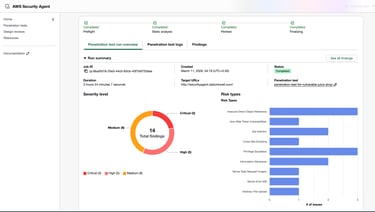


From my March run against Juice Shop, not generated by this pipeline:
Conclusion
In this walkthrough we built a CI/CD pipeline around AWS Security Agent. We opened a deliberately vulnerable pull request and watched the agent review it. We used a GitHub ruleset to turn its comments into a merge block, took the authorized bypass and followed it in the audit log. We merged a fixed version cleanly, and then deployed the result to EC2 through GitHub Actions with keyless OIDC access.
My honest view is that the agent is a good reviewer. It is fast, specific, and sees context that a pattern scanner misses. It is not a gate by itself. The enforcement came from GitHub, and the judgment came from the person who resolved or bypassed each thread. Treat it as a second pair of eyes beside deterministic checks, and keep people accountable for the decision to merge.
The penetration testing stage deserves its own planning because of how it is billed. Its value is real, as my March run showed, but it is a deliberate spend and not a step to run on every change.
Disclaimer
The activities demonstrated in this blog are performed in a controlled environment using intentionally vulnerable applications such as OWASP Juice Shop. The purpose of this walkthrough is purely educational and to demonstrate how automated security reviews and deployment pipelines can be built using AWS Security Agent and GitHub.
Do not attempt to scan, test, or exploit vulnerabilities in systems, applications, or networks without explicit authorization from the system owner. Unauthorised security testing may violate laws, regulations, and organizational policies.
Always perform security testing only within environments where you have proper permission and follow responsible disclosure practices when reporting vulnerabilities.


What it costs, and why I did not rerun it
AWS bills penetration testing at $50 per task hour, metered per second. A task hour counts all the work the agent does in parallel, so the time on the clock and the time you are billed for can be far apart. AWS's own pricing page includes an example where 24 task hours come to $1,200. You cannot get a precise estimate up front, because the agent adapts its plan as it explores, and I found no hard spending cap. An AWS budget alert only notifies you, and billing data arrives late. Stopping a run early still charges for the work already done. New accounts get a trial, but mine was already used up, so I chose not to start a run I could not price.
If you want to control the cost, the only real lever I can see is scope. A narrow run limited to a few paths should cost less than a full domain run, but I cannot tell you how much less.
Where it belongs in a pipeline
The penetration test can start automatically after a deployment. AWS Security Agent has a CI/CD mode. A GitHub Actions job runs after the deploy job, starts the test against staging, and holds back promotion to production if it finds a validated exploitable issue. It tests only the commits since the last cleared deployment, so each run covers the change and not the whole application. A full run can also be started from the command line, so it can run on a schedule or on release candidates.
I did not set this up in my lab, so I cannot tell you how long a scoped run takes or what it costs. A full run took me 2 hours and 24 minutes, which is why I would not run one on every pull request. I would use a scoped run after each staging deployment and a full run on release candidates. The findings should decide whether a build is promoted to production, not whether a pull request merges. Every finding then goes back to a developer as a new pull request, which has to pass the gate again.
An automated test finds common vulnerabilities well and does the first round of reconnaissance quickly. It is not a replacement for a manual penetration test. Business logic flaws and advanced attack chains still need a person.
Sources: https://aws.amazon.com/blogs/security/penetration-testing-every-deployment-with-aws-continuum/
What Worked and What Did Not
What worked well
The review arrived in about three minutes and read like a human review, with a severity, evidence and a concrete fix.
The agent reasoned about context, such as routes that were not registered yet and placeholder keys.
GitHub rulesets gave me the block, the bypass and the audit trail with no custom code.
Keyless OIDC deployment worked once the subject format was right, and the whole run took under five minutes.
What did not work, or needs care
The agent posts comments and not a required status check, so the gate depends on conversation threads that a person can click through.
Results are not deterministic. The same code gets the same verdict but different wording, and on my pipeline file, different findings.
The agent sees only the diff, so it cannot judge controls that live outside the repository.
It made at least one factual mistake about my own code.
Imported workflows, plan limits for rule enforcement and the OIDC subject format each cost me time, and no documentation I read warned me about them.
Lab vs Production: What I Would Change
This pipeline proves the flow works, but several choices would not survive a production review. Here is what I would change.
Keep a deterministic scanner as the hard gate. A rule based scanner such as CodeQL gives the same answer every time and publishes a status check that branch rules can require. Use AWS Security Agent beside it as a contextual reviewer for your own requirements. (CodeQL on private repositories needs a paid GitHub add on, so check current pricing.)
Make the gate machine enforced. Replace thread resolution with a required status check that fails when blocking findings exist.
Add an approval step before deploying. A GitHub Environment with a required reviewer gives a visible go ahead. It changes the identity GitHub presents to AWS, so the IAM trust policy must be updated to match.
Pin third party actions to commit SHAs, turn on GitHub's setting that requires it, and let Dependabot propose updates.
Use HTTPS. Put an ACM certificate on the load balancer and redirect HTTP to HTTPS.
Do not leave a vulnerable app open to the internet. Limit the load balancer to known source addresses, keep staging in its own network and delete the environment after testing. If you restrict access, remember the penetration test needs to reach the target too.
Alert on bypasses. The policy_override audit event should page someone. As far as I know, streaming the audit log to a SIEM is an Enterprise feature, so smaller teams would need a manual review.
Scan the whole repository on a schedule. Pull request reviews cover new risk only. Existing issues need a separate full scan.
Run penetration tests on release candidates and let their findings gate promotion to production.
Clean up DNS when you tear a lab down. A CNAME that still points at a deleted load balancer is a dangling record, the kind that enables subdomain takeover.
Cost Summary
These are the figures I saw, or approximate estimates where I say so.
The corrected trust policy, with an exact match on the full subject. Organization and repository details blurred.
Daily Ink Well
© 2024. All rights reserved.